
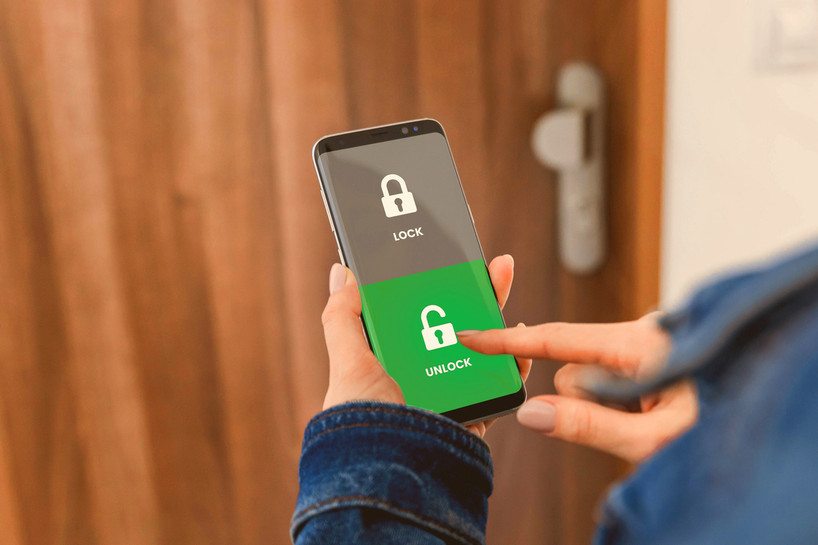
For most of the history of home locks, convenience and security have pulled in opposite directions. The easier a lock is to use, the easier it usually is to get around. A spare key under the doormat is convenient. So is leaving the door unlocked for a delivery, or handing a copy of your house key to the dog walker. None of those habits is secure, and most homeowners know it.
That trade-off is exactly what smart locks are built to remove. A good smart deadbolt makes the door easier to open for the people who should be coming in, and harder to open for everyone else. In this guide, we look at how smart locks increase convenience and security at the same time, walk through the everyday moments where the difference is easiest to see, and explain what to look for so you get both benefits from the lock you choose.
If you want the bigger picture first, our overview of the benefits of smart locks for your home covers what a smart lock is and how it compares with a traditional keyed lock. This article focuses on one specific question: how does a smart lock make daily life easier without making your home less safe?
Why Convenience and Security Usually Conflict
A traditional pin-tumbler lock has a single kind of credential: the physical key. Every convenience you add to a keyed lock means adding more keys, or making the existing ones easier to reach. That is where the risk creeps in.
- More copies, less control. Each key you hand out is a key you cannot take back with certainty. Copies can be made without your knowledge.
- Hidden spares are predictable. Doormats, flowerpots, fake rocks and the top of the door frame are the first places anyone checks.
- Lost keys are a lingering worry. If a key goes missing, the only truly safe fix is to rekey or replace the lock.
- Unlocked doors are tempting shortcuts. When a lock is a hassle, people leave it unlocked "just for a few minutes."
Smart locks change the equation because the credential is no longer a single piece of cut metal. It can be a code you choose, a phone app, or a time-limited share. You can hand out access without handing out keys, and you can change that access whenever you need to.
How Smart Locks Increase Convenience and Security in Everyday Life
The clearest way to understand smart lock convenience and security is to look at ordinary moments in a normal week. Here is how a smart deadbolt handles each one.
Leaving the House in a Hurry
With a keyed deadbolt, locking up means finding your keys, often while holding a bag, a coffee and a phone. On busy mornings, it is easy to skip the deadbolt altogether. With a keypad smart lock, locking the door does not depend on finding anything in your pockets, so the deadbolt actually gets used. That is a security gain that comes directly from convenience: a lock that is easy to use is a lock that gets used every time.
Coming Home With Full Hands
Groceries, a sleeping child, a stack of packages. A keypad lets you punch in a code with one finger instead of setting everything down to dig for a key. Because there is no key in your hand, there is also no key to drop, misplace or leave hanging in the lock.
Letting in a Dog Sitter, Cleaner or Contractor
This is where smart locks really shine. With a keyed lock, your options are to be home, leave a key somewhere, or give out a copy. With a Bluetooth smart deadbolt, you can share access through the app instead. The Bluetooth deadbolts we carry let you share access for a single use or by date and time, which makes them a good fit for dog sitters, cleaning services and other regular visitors who need to get in without being given an actual key.
The security benefit is just as important as the convenience. A time-limited share is only useful for the window you set. There is no copy to return, no spare under the mat, and no wondering who still has a key from last year.
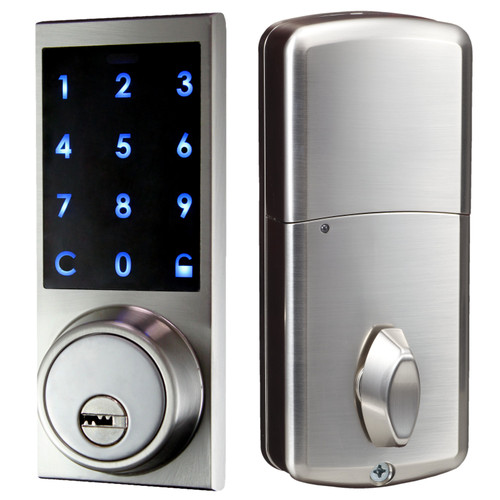
Bluetooth Digital Panel Smart Deadbolt
Open with a code, the app or a key, and share access for a single use or by date and time.
Shop NowKids Coming Home From School
House keys and kids are a famously bad combination. Keys get lost, left at friends' houses or loaned out. A personal entry code removes that problem. Your child only needs to remember a short code, and if it is ever shared too widely, you can change it. Every smart deadbolt in our residential range lets you change the code as needed.
It also takes some pressure off the after-school routine. There is no key to hide outside for the days when one goes missing, and no need to leave the door unlocked because someone might forget theirs.
Hosting Guests or Renting Out a Property
For rental homes and short-term stays, keys are one of the biggest headaches. Guests forget to return them, copies circulate, and every turnover raises the question of whether the lock should be changed. With a smart lock, you can change the code between guests in minutes instead of rekeying. With a Bluetooth model, you can also send a share that matches the dates of the stay.
Losing Your Keys
If you lose the key to a traditional lock, the safe answer is a new lock or a rekey. With a smart deadbolt that has a keypad, you can still get in with your code. Our deadbolts also include a key override on the models that come with keys, so the physical key becomes a backup rather than the only way in.
What Makes a Smart Lock Secure, Not Just Convenient
Convenience features only help if the lock underneath is solid. When you compare options, look at these security fundamentals first.
A Real Deadbolt
A smart lock should still throw a proper deadbolt into the door frame. All four of our exterior smart locks are residential dead bolt locks, so they replace the deadbolt you already rely on rather than adding a weaker latch.
Codes You Control
Being able to change the code whenever you want is one of the most important security features of any keypad lock. It means a code that has been shared too widely, or seen by someone else, is easy to retire. Treat codes the way you would treat a password: avoid obvious choices such as a birthday or 1234, and change the code when circumstances change.
A Mechanical Backup
Electronic locks run on batteries. The residential deadbolts we sell use 3 AA batteries, and the models with key override give you a physical way in if the batteries run down. Keep that backup key somewhere safe and reachable, not under the doormat. Our guide to electronic lock best practices for homeowners covers how to store the backup key, when to change batteries and how to keep a keypad hard to read.
Sensible Sharing Controls
On Bluetooth models, the ability to share access for a single use or for a set date and time is a security feature as much as a convenience. Access that ends on its own is access you do not have to remember to revoke.
A Secure Phone and App
If your lock works with an app, your phone becomes part of your security. Use a screen lock, keep the app updated and do not share your account login. If you are wondering how safe the wireless side is, read our article on whether Bluetooth locks can be hacked for a plain-English look at the common concerns.
Choosing the Right Level of "Smart" for Your Door
Not every home needs every feature. The right smart lock is the one that matches how your household actually comes and goes. Here is how the residential smart deadbolts at Lock Connection compare.
Keypad Only: Push Button with Key
A membrane push-button keypad with a code you can change as needed. This is the simplest step up from a keyed deadbolt and suits households that mainly want to stop carrying keys.
Keypad With Keys: Digital Panel
The Digital Panel with Keys residential dead bolt lock opens with a code on the digital panel or with either of the 2 supplied keys. It is a good choice if you want keyless convenience day to day, with a familiar key as a backup.
Keypad Plus App: Bluetooth Models
The Bluetooth Push Button and Bluetooth Digital Panel deadbolts add a phone app on top of the keypad. The app allows single-use sharing or sharing by date and time, so these are the models to choose if you regularly let other people into your home, run a rental, or simply like managing access from your phone.
All four exterior deadbolts share the same practical specifications: they run on 3 AA batteries, have a working temperature range of -10°C to 45°C (14°F to 113°F), and come in a satin finish. That temperature range matters if your door faces harsh winters or very hot afternoon sun, so check it against your local climate before you buy.

Bluetooth Push Button Smart Deadbolt
Push-button keypad plus app sharing, ideal for rentals, sitters and cleaning services.
Shop NowExtending Convenience and Security Beyond the Front Door
The same idea, easy access for the right people and no access for everyone else, works inside the home as well. Many households have a drawer, cabinet or closet that holds medication, documents, firearms, jewelry or tools that should not be open to everyone. A smart cabinet lock gives that space the same keyless, controllable access as your front door.
Our range of Bluetooth cabinet and drawer locks includes hidden locks, fingerprint and Bluetooth combinations, and models that pair Bluetooth with RFID cards or fobs. Check each product page for compatibility, because some Bluetooth cabinet locks support iOS only.

Fingerprint and Bluetooth Cabinet Lock
Keyless fingerprint and Bluetooth access for drawers and cabinets inside the home (Bluetooth on iOS).
Shop NowSimple Habits That Keep Both Benefits
A smart lock delivers the most value when a few easy habits support it.
- Change codes after a change in circumstances. A new cleaner, the end of a rental stay or a code that was shared too widely are all good reasons.
- Use time-limited shares instead of permanent ones whenever the visit has a natural end date.
- Replace batteries on a schedule rather than waiting for them to run flat. Putting it on the calendar twice a year is an easy routine.
- Keep the backup key secure. A smart lock does not help if the old spare is still under the flowerpot.
- Wipe the keypad occasionally so worn or smudged buttons do not hint at your code.
- Check the door itself. A strong frame, a solid door and long strike-plate screws help any deadbolt, smart or not.
Frequently Asked Questions
Are smart locks really more secure than regular locks?
A smart deadbolt is as strong as the deadbolt and door it is installed on, and it adds security through better control of who can get in. Codes can be changed, Bluetooth shares can be limited to one use or a date range, and there are no copied keys to worry about. Combined with good habits, that makes most homes more secure than they are with a keyed lock and a hidden spare.
What happens if the batteries die?
Our residential smart deadbolts run on 3 AA batteries. The models that come with keys can be opened with the key override if the batteries run down. The simplest protection is to replace the batteries on a regular schedule.
Do I need a phone to use a smart lock?
No. Every smart deadbolt in our residential range has a keypad, so you can always use a code. A phone is only needed for the app features on the Bluetooth models, such as sharing access.
What if I lose my phone?
You can still get in. The keypad works without the app, so your code opens the door as usual, and the models that come with keys can also be opened with the key override. Once you have a replacement phone, set the app up again, and if the lost phone did not have a screen lock, change your door code as a precaution.
Can I give someone temporary access?
Yes. With the Bluetooth deadbolts, the app allows single-use sharing or sharing by date and time. With keypad-only models, you can give a code and change it afterwards.
Are smart deadbolts suitable for cold climates?
Check the operating range before you buy. Our residential smart deadbolts list a working temperature of -10°C to 45°C (14°F to 113°F).
Get Smart Lock Convenience and Security for Your Home
Smart locks remove the old trade-off between a door that is easy to use and a door that is hard to get past. Keyless entry stops the hunt for keys, changeable codes and time-limited shares keep you in control of who gets in, and a key override gives you a reliable backup. The result is a home that is easier to live in and harder to break into.
Ready to upgrade? Browse our full range of residential door electronic locks to compare keypad, digital panel and Bluetooth smart deadbolts, and choose the one that fits the way your household comes and goes. If you have questions about which model suits your door, our team is happy to help.