
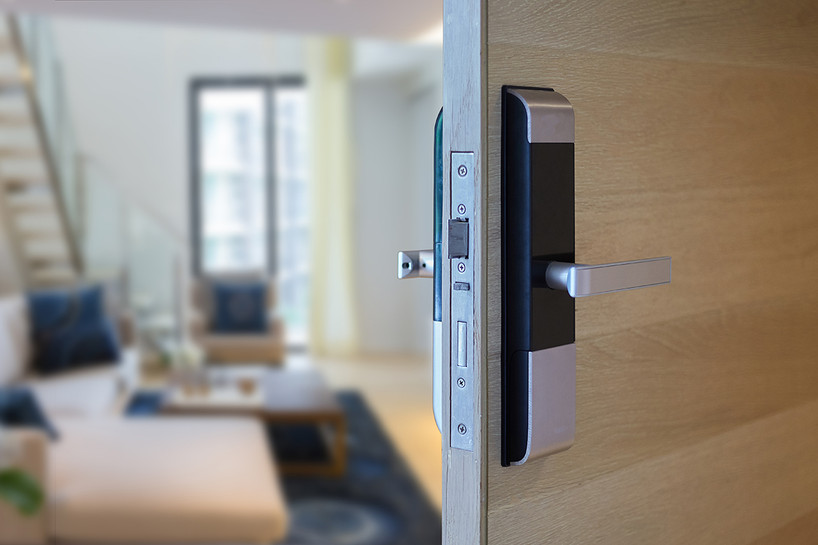
An electronic lock can make your front door easier to use and harder to get past, but only if you treat it as a security system and not just a gadget. Following a few simple electronic lock best practices keeps your codes private, your batteries fresh and your backup key where it belongs. Skip them and even a well-made keypad deadbolt can turn into a weak spot.
This guide covers the habits that matter most for homeowners who use keypad or Bluetooth deadbolts. You will learn how to set and protect codes, share access safely, store the backup key, stay ahead of battery changes, and build a simple maintenance routine. Most of these steps take only a few minutes a month.
Why Electronic Locks Need Their Own Best Practices
A traditional deadbolt has one main risk: someone getting hold of a key. An electronic deadbolt changes the picture. You trade a physical key for a code, a phone app or both, and each of those brings its own habits to learn.
- Codes can be shared, seen or guessed. A code that was handed out to a contractor two years ago may still work today.
- Power matters. The keypad and motor run on batteries, so a dead set of batteries can leave you relying on the backup key.
- The app is part of the lock. With a Bluetooth model, your phone and your app account become another way in.
- The door still does the heavy lifting. The bolt is only as strong as the frame and strike plate it locks into.
The good news is that each of these risks is easy to manage once you know what to watch for.
Best Practice 1: Create Strong Codes and Keep Them Private
The code is the new key, so treat it with the same care. Our keypad deadbolts let you change the password whenever you need to, which makes good code habits easy to keep.
Choose a code that is hard to guess
- Avoid obvious patterns such as 1234, 0000, 2580 or repeated digits.
- Skip birthdays, anniversaries, house numbers and the last digits of your phone number. These are often easy to find.
- Use a longer code where your lock allows it. Every extra digit makes guessing much harder.
Protect the master code and setup papers
The master or programming code controls who can add and remove user codes, so it deserves the most protection. Do not write it on the door frame, in the garage or on a sticky note in a kitchen drawer. Store the setup paperwork and the master code in a locked, private place inside the house, and keep a copy somewhere secure away from home if you are worried about losing it.
Change codes on a schedule and after any change in access
Set a reminder to change your everyday code every few months. Change it right away when a roommate moves out, a contractor finishes a job, a relationship ends, or you suspect someone watched you enter it. If you are shopping for a lock that combines a keypad with a keyed backup, the Digital Panel with Keys residential deadbolt lets you open the door with a code or either of its two supplied keys, and you can change the password as needed.
Best Practice 2: Share Access the Smart Way
One of the biggest advantages of electronic locks is that you can let people in without handing out a key. That advantage disappears if everyone shares one code that never changes.
- Give each regular visitor their own access where your lock supports it, so you can remove one person without changing everyone's code.
- Use temporary access for one-time visitors. Our Bluetooth deadbolts work with an app that allows single-use sharing or sharing by date and time, which suits dog sitters, cleaners and delivery of large items.
- Remove access as soon as it is no longer needed. Put a reminder in your calendar on the last day of a job or rental stay.
- Never send codes in group chats or public posts. Share them directly with the person who needs them.
If you rent out a property or host guests, these habits also save you the cost and hassle of rekeying every time someone leaves.
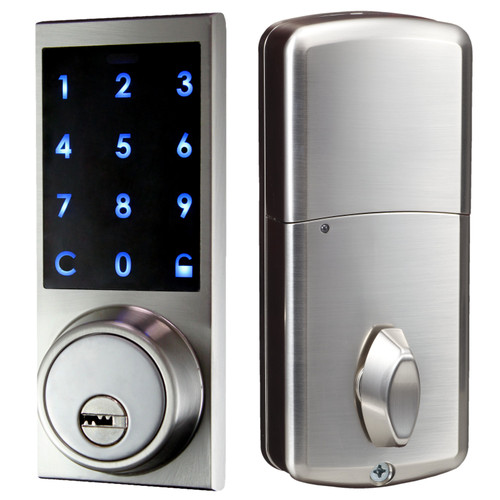
Bluetooth Digital Panel Deadbolt
Open with the app, a keypad code or a key, and share single-use or timed access.
Shop NowBest Practice 3: Keep the Backup Key Safe but Reachable
Many homeowners are surprised to learn that most electronic deadbolts still have a key. All four of our exterior keypad and Bluetooth deadbolts include a key override, which gives you a way in if the batteries die or the keypad is damaged. That key is also a way in for anyone else who finds it, so where you keep it matters.
- Do not hide it outside. Fake rocks, door mats, planters and the top of the door frame are the first places an intruder checks.
- Keep a spare with someone you trust, such as a nearby family member or neighbor, rather than near the door.
- Carry one key in your car or bag if you often come home late, but do not label it with your address.
- Store extra keys and code cards inside a locked drawer or cabinet so they are not lying around for visitors or workers to see.
For more ideas on protecting codes and backup keys, see our guide on how to keep your smart locks safe and secure.
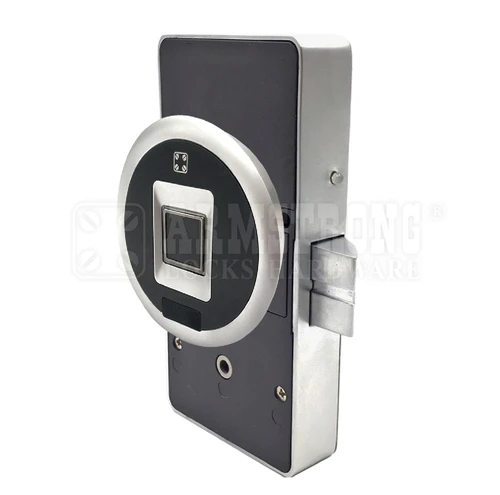
Reinforced Fingerprint Cabinet Lock
Lock away spare keys and setup papers. Stores 10 manager and 10 user fingerprints.
Shop NowBest Practice 4: Stay Ahead of the Batteries
Battery care is the easiest electronic lock best practice to follow and the one people forget most. Our residential deadbolts run on three AA batteries. When they get low, the lock may become slow or unreliable before it stops working completely.
Simple battery habits
- Replace batteries on a schedule rather than waiting for them to fail. Many people tie it to another routine, such as changing smoke alarm batteries or the start of each season.
- Use fresh, good-quality alkaline batteries from the same pack. Do not mix old and new batteries.
- Act on warning signs. A dim keypad, slow motor, repeated beeps or a bolt that does not fully extend usually means it is time for new batteries.
- Keep a spare set in the house so you are never waiting on a store run.
Mind the temperature
Batteries and electronics both work best within their rated range. Our deadbolts list an operating temperature of -10°C to 45°C (14°F to 113°F). If your door faces harsh winter cold or direct afternoon sun, check the batteries more often and pay attention to how the lock responds on extreme days.
Best Practice 5: Keep the Keypad Clean and Hard to Read
Over time, the buttons you press most can show wear marks, fingerprints or smudges. Someone looking closely could narrow down which digits are in your code.
- Wipe the keypad gently with a soft, slightly damp cloth every few weeks. Avoid harsh cleaners and never spray liquid straight onto the lock.
- Change your code now and then so the same keys do not always get the most use.
- Shield the keypad with your hand when entering the code if neighbors, delivery drivers or passers-by can see your door.
- Check the keypad face for cracks or loose edges that could let moisture in, and address damage early.
Best Practice 6: Strengthen the Door Around the Lock
An electronic deadbolt protects the door only as well as the door, frame and strike plate allow. If the bolt does not fully extend into a solid frame, the best keypad in the world will not stop a strong kick.
- Check alignment. The bolt should slide in and out smoothly without you pushing or lifting the door. A bolt that drags also drains the batteries faster, because the motor works harder.
- Inspect the strike plate and screws. Make sure they are tight and anchored firmly in the frame.
- Look at the door itself. Gaps, rot or a loose frame weaken any lock.
- Fix sticking problems early. Our article on common door lock issues and how to resolve them walks you through misaligned latches and stiff mechanisms.
Weather stripping, seasonal swelling and settling houses can all shift a door slightly. A quick test each season catches these changes before they become a problem.
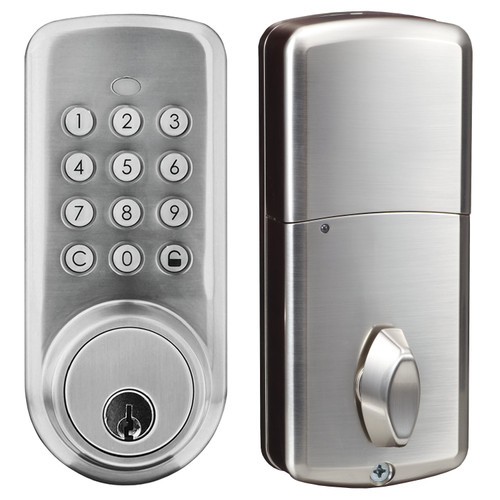
Push Button Deadbolt with Key
Keypad deadbolt with a key override. Change the code whenever you need to.
Shop NowBest Practice 7: Protect Your Phone and App Account
With a Bluetooth deadbolt, your phone becomes a key. Treat it that way.
- Use a screen lock on your phone, such as a PIN, fingerprint or face unlock.
- Keep the lock app and your phone's operating system updated.
- Do not share the admin account. Add other people as users so you stay in control of who has access.
- If your phone is lost or replaced, review the users and access in the app as soon as possible.
If you are wondering how safe wireless locks really are, read our article that answers the question can Bluetooth locks be hacked and what you can do to reduce the risk.
A Simple Electronic Lock Maintenance Routine
Turning these electronic lock best practices into a routine is the easiest way to keep up with them. Here is a schedule most homeowners can follow without much effort.
Every month
- Lock and unlock the door with the keypad and, if you have one, the app.
- Watch and listen to the bolt. It should move smoothly and fully.
- Wipe the keypad clean.
Every three months
- Change your main user code.
- Review who has access and remove anyone who no longer needs it.
- Test the backup key so you know it still turns smoothly.
Twice a year or as needed
- Replace the batteries, or sooner if you see warning signs.
- Check the strike plate screws, door alignment and weather stripping.
- Update the app and your phone software.
The mechanical parts of a lock still need care too. Our guide to maintaining your residential door locks covers cleaning, lubrication and testing the deadbolt and strike plate.
Common Mistakes to Avoid
- Keeping the factory default code. Always set your own code and master code during setup.
- Using one code for everyone. It makes it impossible to remove one person's access.
- Hiding the backup key outside. It defeats the point of upgrading your lock.
- Waiting for the batteries to die. Change them on a schedule instead.
- Ignoring a sticky bolt. A dragging bolt is a door problem that also shortens battery life.
- Forgetting to remove old users. Former tenants, contractors and guests should not keep access.
Frequently Asked Questions
How often should I change my electronic door lock code?
Every few months is a good habit for everyday codes. Change it immediately after a contractor, tenant or guest no longer needs access, or if you think someone saw you enter it.
What happens if the batteries in my electronic deadbolt die?
The keypad and motor stop working, so you will need the backup key. That is why all four of our exterior deadbolts include a key override, and why you should replace the batteries before they run flat.
Where is the safest place to keep the backup key?
Not outside the house. Keep one with a trusted neighbor or family member, carry one with you if needed, and store any extras in a locked drawer or cabinet inside your home.
Are Bluetooth door locks safe to use?
They can be very convenient and secure when you protect your phone, keep the app updated, keep admin access to yourself and remove users you no longer need.
Can I give a cleaner or dog sitter temporary access?
Yes. Our Bluetooth deadbolts work with an app that allows single-use sharing or sharing by date and time, so you can give access for a set window without sharing your own code.
Put These Electronic Lock Best Practices to Work
An electronic deadbolt is a smart upgrade for most homes, and a few simple habits keep it working the way it should. Set strong codes and change them often, share access carefully, keep the backup key out of sight, replace batteries on a schedule and check the door around the lock. Follow these electronic lock best practices and you get all the convenience of keyless entry without giving up security.
Ready to upgrade or replace your front door lock? Browse our residential door electronic locks, including keypad and Bluetooth deadbolts with a key override, and contact Lock Connection if you have any questions about which model is right for your home.