

Keys get lost, copied, lent out and forgotten. For decades that was simply the price of locking your door. Today, the benefits of smart locks give homeowners a better option: entry by code, phone or fingerprint, easy control over who can get in, and no more hiding a spare key under the mat. Whether you are replacing an old deadbolt or securing a cabinet full of valuables, a smart lock can make daily life simpler while keeping your home better protected.
This guide walks through what a smart lock is, the real-world benefits it brings, who gains the most from one, the drawbacks to plan for, and how to choose the right model for your door or cabinet. If you have already read our post on how smart locks increase everyday convenience and security, think of this as the complete buyer-focused companion.
What Is a Smart Lock?
A smart lock is an electronic lock that lets you open it with something other than, or in addition to, a traditional metal key. Instead of relying on a cut key and a pin tumbler alone, a smart lock uses a battery-powered mechanism that responds to a code, a wireless signal or a fingerprint. Most residential models still include a mechanical key cylinder as a backup, so you are never fully dependent on electronics.
Common Types of Smart Locks
- Keypad (code) locks: You enter a numeric code on a push-button or touchscreen panel. Codes can be changed whenever you need.
- Bluetooth locks: A phone app communicates with the lock over a short-range wireless connection. Many apps also let you share access with other people.
- Biometric (fingerprint) locks: A sensor reads a registered fingerprint, so there is nothing to carry or remember.
- RFID locks: A card, fob or tag is held near a reader. These are especially popular for hidden cabinet and drawer locks.
Many products combine two or more of these methods. A Bluetooth keypad deadbolt, for example, can be opened by code, by phone or by key, which gives you flexibility for every situation.
The Top Benefits of Smart Locks for Your Home
The appeal of a smart lock goes well beyond novelty. Here are the practical smart lock benefits homeowners notice first.
1. Keyless Entry Means No More Lost or Hidden Keys
With a keypad or Bluetooth deadbolt, the code in your head or the phone in your pocket becomes your key. You no longer have to dig through a bag at the door, worry about a key falling out of a pocket on a run, or leave a spare under a flowerpot where a stranger could find it. Keyless entry also helps family members who tend to lose keys, such as children coming home from school or older relatives.
2. You Decide Exactly Who Can Get In
A physical key works for anyone who holds it, and you rarely know how many copies exist. A smart lock flips that around. You choose who receives a code or app access, and you can change a code the moment it is no longer needed. That control is one of the biggest benefits of smart locks for families, landlords and anyone who has handed out keys in the past and lost track of them.
3. Easy, Temporary Access for Guests and Service Providers
Dog walkers, house cleaners, contractors and visiting relatives often need to get in while you are away. Instead of making key copies, you can share a code or digital access. Our Bluetooth push button deadbolt with key override, for example, works with an app that allows single-use sharing or access limited by date and time. That makes it well suited to rental homes, pet sitters and cleaning services, and nobody walks away with a key you have to chase down later.
4. No Rekeying When Circumstances Change
When a roommate moves out, a relationship ends or a contractor finishes a job, a traditional lock may need to be rekeyed or replaced to be sure old keys no longer work. With a smart lock, you simply change the code or remove that person's access. It is faster, cheaper and something you can do yourself in minutes.
5. Convenience When Your Hands Are Full
Arriving home with groceries, a toddler on your hip or a dog on a leash is much easier when you can tap a few buttons instead of fumbling for a key. Small moments like these are often what convince people they never want to go back to a key-only deadbolt.
6. A Mechanical Backup for Peace of Mind
Good residential smart locks keep a key cylinder for emergencies. If batteries run low or a phone is not available, you can still open the door the traditional way. All four of our exterior smart deadbolts include key override, so you get modern convenience without giving up a reliable fallback.
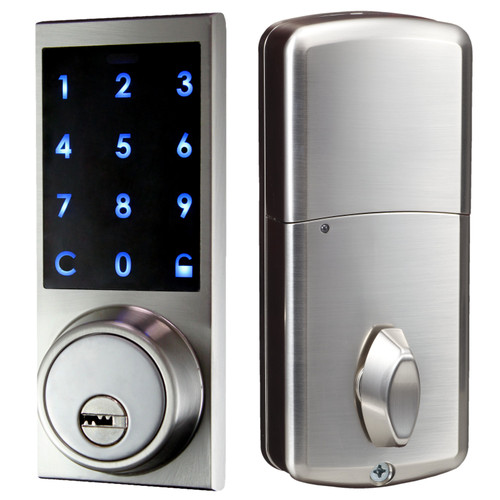
Bluetooth Digital Panel Deadbolt with Key
Open by app, touch-panel code or either of the 2 supplied keys, and share access by single use or date and time.
Shop NowSmart Lock Benefits Beyond the Front Door
Most people picture a smart lock on an exterior door, but some of the most useful applications are inside the home. Electronic cabinet and drawer locks bring the same keyless control to the places where you keep your most important or most dangerous items.
- Medicine and cleaning supply cabinets: Keep curious children away from medications and chemicals without a key that can go missing.
- Firearm and valuables storage: Hidden electronic locks secure a gun cabinet, jewelry drawer or document storage while leaving no visible keyhole.
- Home offices: Lock filing drawers that hold tax records, passports or client files.
- Liquor cabinets and entertainment storage: Control access when teenagers, guests or renters are in the home.
- Furniture builds: Woodworkers and DIY builders use concealed locks to create hidden compartments in tables, beds and shelving.
Our range of Bluetooth cabinet and drawer locks includes hidden models that mount inside the furniture, plus combination units that pair Bluetooth with RFID or fingerprint access. Because the lock sits out of sight, there is far less for a would-be thief to pry at or pick.

Bluetooth and RFID Hidden Cabinet Lock
A concealed lock for cabinets and drawers that works with the free app, plus 1 user card and 2 user fobs.
Shop NowWho Gains the Most From Smart Locks?
Almost any household can enjoy the benefits of smart locks, but some situations make the upgrade especially worthwhile.
Busy Families
Parents can give each child a code, skip the after-school key handoff, and avoid the scramble when someone forgets their keys. Cabinet locks add another layer of child safety inside the home.
Landlords and Short-Term Rental Hosts
Changing a code between tenants or guests is far easier than rekeying a lock or meeting someone in person to hand over keys. Time-limited app sharing is a natural fit for rentals, and it reduces the risk of unreturned keys.
Pet Owners and People Who Travel
If a sitter or neighbor needs to check in on your home or pets, you can grant access for only the days you are away. When you return, that access ends.
Older Adults and Caregivers
Keypad entry removes the need to grip and turn a small key, and trusted caregivers or family members can be given their own access without copying keys.
Smart Locks vs. Traditional Keyed Locks
Traditional locks still have their place, and a well-installed mechanical deadbolt is a solid security device. Here is how the two approaches compare on the points homeowners care about most:
- Access control: Keyed locks work for anyone with a copy. Smart locks let you assign, change and remove access whenever you choose.
- Lost keys: Losing a key can mean rekeying. Losing track of a code simply means setting a new one.
- Guest access: Keyed locks require copies or a hidden spare. Smart locks allow codes or app-based sharing.
- Power: Mechanical locks need no power. Smart locks run on batteries, so you will replace them periodically. Our exterior smart deadbolts use 3 AA batteries.
- Backup: Smart deadbolts with key override give you both systems in one lock.
For many homes, the best answer is not choosing one or the other but getting both in a single device: a smart deadbolt with a keyed backup.
Potential Drawbacks and How to Manage Them
An honest look at smart locks includes their limitations. The good news is that each one is easy to plan for.
Battery Life
Every electronic lock depends on batteries. Get into the habit of checking or replacing them on a schedule, such as when you change smoke alarm batteries, and keep a fresh set on hand. Keep your backup key somewhere safe and reachable, not inside the locked house.
Operating Conditions
Electronics have limits. Our exterior smart deadbolts list a working temperature range of -10°C to 45°C (14°F to 113°F), so consider your local climate and how exposed the door is before you buy.
Phone Compatibility
Not every Bluetooth lock supports every phone. Some of our Bluetooth cabinet locks work with iOS only, while others support both iOS and Android. Always check the product description before ordering so the lock matches the phones in your household.
Code and App Security
A smart lock is only as secure as the way you use it. Avoid obvious codes like birthdays or 1234, change codes when people no longer need access, and protect the phone that runs the app. Our guide to keeping your smart lock safe and secure covers these habits in more detail, and if you are worried about wireless attacks, read our breakdown of whether Bluetooth locks can be hacked.
The Door Itself
No lock can make up for a weak door or frame. A smart deadbolt works best on a solid door with a sturdy frame and strike plate.
How to Choose the Right Smart Lock
Use this quick checklist to narrow down your options:
- Where will it go? An exterior door needs a residential deadbolt. A cabinet, drawer or gun storage unit needs a cabinet lock sized for that furniture.
- How will you open it? Decide between keypad, Bluetooth, fingerprint, RFID or a combination. Households with young children or many users often prefer codes, while people who never want to remember anything may prefer fingerprint.
- Do you need to share access? If guests, sitters or tenants will come and go, choose a Bluetooth model with app-based sharing.
- Is there a backup? For doors, look for key override. For cabinet locks, check the product's emergency or power-backup options.
- What powers it? Note the battery type, and for cabinet locks check whether an optional AC adapter is available.
- Is your phone supported? Confirm iOS and Android compatibility for any Bluetooth lock.

Fingerprint and Bluetooth Square Cabinet Lock
Open drawers and cabinets with a fingerprint or your iPhone, powered by 4 AAA batteries or an optional AC adapter.
Shop NowFrequently Asked Questions About Smart Locks
Are smart locks safer than regular locks?
Smart locks are not automatically safer, but they remove some of the biggest weaknesses of keyed locks: unknown key copies, hidden spares and keys that are never returned. Used with strong codes, a solid door and a protected phone, a smart lock gives you more control over who can get in.
What happens if the batteries die?
Many electronic locks warn you as power runs low. On a smart deadbolt with key override, you can always open the door with the mechanical key. Replace batteries on a regular schedule so it never comes to that.
Can I still use a key with a smart lock?
Yes, if you choose a model with key override. All four of our exterior smart deadbolts include a key backup, and the digital panel models come with 2 keys.
Do smart locks need Wi-Fi?
Not necessarily. Keypad locks work entirely on their own, and Bluetooth locks connect directly to a nearby phone through an app. Check each product's description for exactly how its app and sharing features work.
Can smart locks be used on cabinets and drawers?
Absolutely. Electronic cabinet locks use Bluetooth, RFID, fingerprint or keypad access to secure medicine cabinets, gun storage, office drawers and furniture, often with the lock completely hidden inside.
Enjoy the Benefits of Smart Locks With Lock Connection
The benefits of smart locks add up quickly: keyless entry, full control over who can get in, easy temporary access for guests, no rekeying when life changes, and a mechanical backup for peace of mind. Inside the home, the same technology keeps medicine, firearms and valuables behind a lock that only the right people can open.
Ready to upgrade? Browse our residential door electronic locks for keypad and Bluetooth deadbolts with key override, or explore our electronic cabinet locks to secure what matters most inside your home. If you have questions about which lock fits your door or furniture, the Lock Connection team is happy to help you choose.