
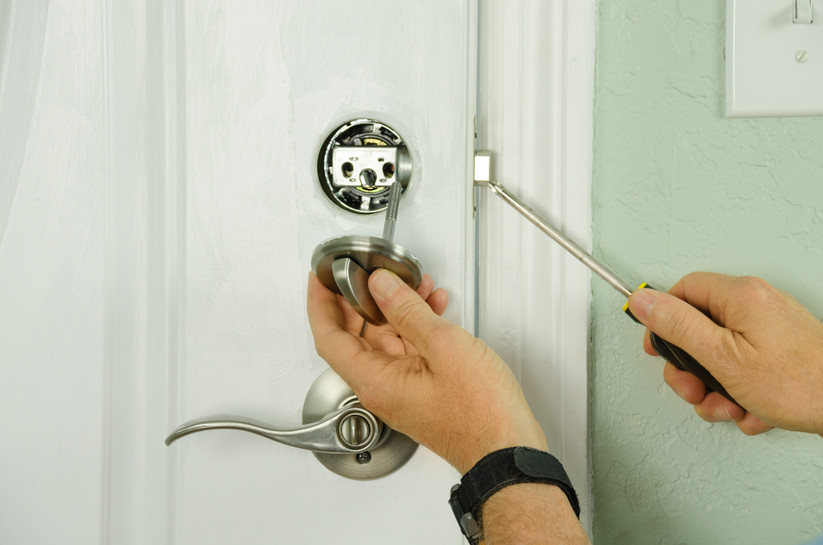
Your front door lock works hard. It gets turned, slammed, rained on, baked in the sun and tested every time someone comes home with an armful of groceries. Because it usually keeps working, it's easy to forget that a lock is a mechanical part that wears out. Knowing the signs you need to replace your locks helps you act before a small annoyance turns into a lockout or, worse, a weak point in your home's security.
This guide focuses on what the lock itself is telling you: the physical symptoms of wear, damage and age that mean it's time for new hardware. We'll walk through each warning sign, explain what it means, help you decide between a quick fix, rekeying or full replacement, and share what to look for when you choose a replacement deadbolt.
Why Door Locks Don't Last Forever
A standard residential lock is a small precision mechanism. Inside the cylinder, spring-loaded pins have to line up exactly before the plug can turn. The bolt then has to slide cleanly through the door edge and into the strike plate on the frame. All of that happens thousands of times a year on a busy entry door.
Over time, several things chip away at that precision:
- Daily use. Pins, springs, cams and the bolt mechanism wear a little every time the lock is operated.
- Weather. Exterior locks face rain, humidity, frost, road salt near entryways and direct sun, all of which can corrode metal and dry out lubricant.
- Dirt and grit. Dust and debris ride into the keyway on your key and slowly build up inside.
- A shifting door. Doors and frames swell, shrink and settle, which puts extra strain on the bolt and latch.
- Changing standards. A basic lock that seemed fine years ago may not match the security or convenience options available today.
Good care slows this process down. If you haven't been cleaning and lubricating your hardware, our guide to routine door lock maintenance is a good place to start. But even a well-maintained lock eventually reaches the point where repair no longer makes sense.
Physical Signs You Need to Replace Your Locks
These are the symptoms you can see, feel or hear when you use the lock. One minor symptom on its own may only call for cleaning or an adjustment. Several at once, or any that affect security, are a strong signal that the lock should be replaced.
The Key Sticks, Drags or Takes Several Tries
A healthy lock accepts the key smoothly and turns with light, even pressure. If you have to jiggle the key, pull it out slightly, or try several times before the cylinder turns, the internal pins are likely worn or the cylinder is gummed up with dirt and old lubricant.
Cleaning and a dry graphite or PTFE-based lubricant sometimes solve the problem. If the stiffness returns quickly, or the key still catches after cleaning, the internal parts are probably worn past the point of a simple fix. Also check the key itself: a heavily worn key or a copy made from a copy can cause the same symptoms, so try a fresh, factory-cut key before deciding.
The Key Wiggles or Turns Too Easily
The opposite problem is just as important. If the key feels loose in the keyway, wobbles up and down, or the cylinder turns with almost no resistance, the internal tolerances may have worn wide. A sloppy cylinder can be easier to manipulate, and in some cases it may even turn with the wrong key. That's a security problem, not just a comfort issue, and it's one of the clearest tell-tale signs that the lock needs replacing.
The Deadbolt Doesn't Fully Extend or Retract
Watch the bolt with the door open and turn the thumb turn. It should travel all the way out and back in with a smooth, positive motion. If the bolt stops short, grinds, or needs to be pushed by hand, there's a problem with the mechanism.
If the bolt moves freely with the door open but binds when the door is closed, the cause may be misalignment between the bolt and the strike plate rather than the lock itself. Our article on fixing common door lock issues walks through how to adjust a strike plate and tell an alignment problem from a worn lock. If the bolt still won't throw fully once the door is aligned, the lock is due for replacement. A bolt that doesn't fully extend into the frame provides far less resistance to a forced entry.
Loose, Wobbly or Shifting Hardware
Grab the exterior side of your lock and gently try to move it. It shouldn't wobble, rotate or shift. Loose hardware may simply need its mounting screws tightened from the inside. However, if the screws won't hold, the screw holes are stripped, or the housing itself is cracked or bent, tightening won't fix it. Loose locks also wear faster, because every turn puts uneven stress on the internal parts.
Rust, Corrosion or Heavy Finish Wear
Surface wear on the finish is mostly cosmetic. Rust, green or white corrosion around the keyway, pitting on the face, or flaking metal are different. Corrosion on the outside often means moisture has reached the inside too, where it attacks springs and pins. Locks on doors that face harsh weather, sit near the coast or catch runoff from a roof edge tend to show this first. Once corrosion affects how the lock turns, replacement is usually the reliable fix.
Scratches, Pry Marks or Other Signs of Tampering
Take a close look at the area around the keyway and along the door edge. Fresh, bright scratches around the keyway, gouges in the door frame near the bolt, or a damaged face plate can point to an attempted break-in. Even if the lock still works, it may have been weakened. A lock that has been attacked should be replaced, and it's worth reviewing the rest of your entry security at the same time.
The Lock Is Simply Old or Low Quality
Not every sign is dramatic. Some locks work fine but were never particularly strong. Builder-grade or bargain hardware, especially on older homes, may have thin housings, short bolts and basic cylinders that offer little resistance to common attack methods such as lock bumping or forced entry. If you don't know how old your locks are or what they're rated for, and you can't remember the last time they were changed, that alone is a reason to evaluate an upgrade.
Electronic Lock Warning Signs
Keypad and smart deadbolts have a few symptoms of their own:
- Batteries drain much faster than they used to, even after a fresh set.
- Buttons or the keypad stop responding consistently, or certain digits fail.
- The motor sounds strained, or the bolt stops part-way.
- The lock frequently loses its programmed codes or settings.
- Moisture or condensation appears behind the keypad cover.
Always try a fresh set of quality batteries first, since weak batteries cause many of these symptoms. If problems continue with new batteries, the electronics or motor may be failing and replacement is the safer choice.
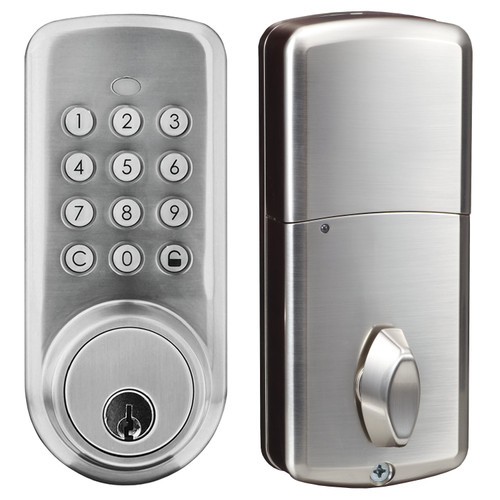
Push Button with Key Residential Deadbolt
Keypad code entry with a backup key. Change the code whenever you need to. Runs on 3 AA batteries, satin finish.
Shop NowSituations That Call for New Locks, Even When They Still Work
A lock in perfect physical condition may still need to change if your circumstances change. Moving into a new home, losing a set of keys, a break-in, or someone no longer needing access are all good reasons to act. We cover each of these in detail in our article on life events that mean it's time to change your locks.
The key question in those situations is whether you need a new lock or just new keys. That brings us to the next decision.
Repair, Rekey or Replace: How to Decide
Not every lock problem requires brand-new hardware. Use this simple framework to choose the right fix.
When a Repair or Adjustment Is Enough
- The lock turns stiffly but improves noticeably after cleaning and lubrication.
- The bolt only binds when the door is closed, pointing to strike plate alignment.
- The hardware is loose but the screw holes and housing are in good shape.
- An electronic lock's problems disappear with fresh batteries.
When Rekeying Makes Sense
Rekeying changes the internal pins so the old keys no longer work, while keeping the existing lock body. It's a reasonable option when the lock is in good condition, reasonably secure and you're happy with how it works, but you need to cut off access from old keys. For example, after moving in or losing a key.
When Full Replacement Is the Better Choice
- The lock is worn, corroded, cracked or loose in ways that cleaning and tightening can't fix.
- The key wiggles, the cylinder feels sloppy, or the bolt won't fully extend.
- There are signs of tampering or forced entry.
- The lock is old, low quality or doesn't meet your current security needs.
- You want features your current lock can't offer, such as keypad entry or app-based access sharing.
- You'd like to stop managing physical keys for family, guests or service providers.
If several items on the replacement list apply, investing in a new lock usually costs less over time than repeated repairs, and it resets the clock on wear.
A Quick Monthly Lock Check You Can Do in Five Minutes
Catching these signs early is easy if you build a short habit around it. Once a month, or at the change of each season, run through this checklist on every exterior door:
- Operate the lock with the door open. The bolt should extend and retract fully and smoothly.
- Operate it with the door closed. There should be no grinding, and you shouldn't need to push or pull on the door.
- Test the key. It should slide in easily, turn smoothly and come out without catching.
- Check for movement. The exterior and interior hardware shouldn't wobble or rotate.
- Inspect the surfaces. Look for rust, corrosion, new scratches around the keyway and damage to the frame.
- For electronic locks, confirm every button responds, note the battery level and check that your access codes still work.
Write down anything that changes from month to month. A lock that is gradually getting stiffer or looser is telling you it's approaching the end of its useful life.
What to Look for in a Replacement Lock
When it's time to replace, use the opportunity to choose a lock that fits how your household actually lives. Our full guide to choosing door locks for your home covers the details, but here are the main points to weigh.
Security and Build
For exterior doors, a deadbolt should be your primary lock. Look for solid construction, a bolt that fully engages the frame, and a strike plate secured with long screws into the door framing. Good installation matters as much as the lock itself.
How You Want to Get In
Traditional keyed locks are familiar and simple. Keypad deadbolts let you enter with a code, which means no hunting for keys and no need to cut copies. A model with a backup key, such as a digital panel deadbolt with key override, gives you code entry for everyday use plus two supplied keys as a backup. Because you can change the code as needed, you can cut off old access without rekeying.
Sharing Access
If you regularly let in family members, dog sitters, cleaners or rental guests, Bluetooth deadbolts add app-based control. The Bluetooth models in our residential range let you open the lock from the app and share access as a single-use pass or for a set date and time window, so you don't have to hand out physical keys.
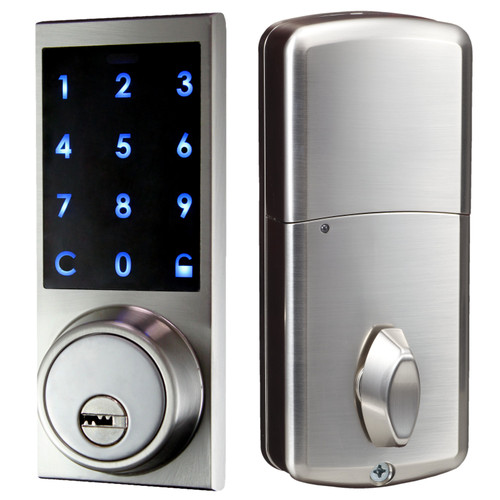
Bluetooth Digital Panel Deadbolt with Key
Open with the app, a code or one of 2 supplied keys. Share single-use or date and time access with guests.
Shop NowPractical Details
- Power: Our residential electronic deadbolts run on 3 AA batteries. Keep a spare set on hand.
- Climate: They are rated for an operating range of -10°C to 45°C (14°F to 113°F), so consider your local weather for exterior doors.
- Finish: These models come in a satin finish.
- Fit: Measure your door and existing hole before you buy, and check product details or contact us if you're unsure about compatibility.
If you're not confident installing a new deadbolt yourself, a professional locksmith can make sure it's fitted and aligned correctly.
Frequently Asked Questions
How often should door locks be replaced?
There's no fixed schedule. The condition of the lock matters more than its age. A well-made lock that's cleaned and lubricated regularly can last many years, while a low-quality lock on a heavily used, weather-exposed door may wear out much sooner. Replace a lock when it shows the warning signs above, or when your security needs change.
Is it cheaper to rekey or replace a lock?
Rekeying is usually the less expensive option when the lock itself is in good working order and you only need to stop old keys from working. If the lock is worn, damaged, corroded or outdated, replacing it is the better value, since rekeying won't fix mechanical or security problems.
Can a lock that still works be unsafe?
Yes. A lock can open and close normally and still be weak. A loose or worn cylinder, a bolt that doesn't fully extend, low-quality construction, or hidden damage from a tampering attempt can all reduce security without stopping the lock from working day to day.
Should I replace all my exterior locks at the same time?
It's often a good idea. Replacing all exterior locks together keeps security consistent across every entry point, and with keyed locks it lets you have them keyed alike so one key opens every door. If budget is a concern, start with the most-used door or any lock showing serious warning signs.
Are keypad deadbolts a good replacement for traditional locks?
For many households they are. Keypad deadbolts remove the need to carry or copy keys, and you can change the code whenever access needs to change. Choosing a model with a key override gives you a backup way in if the batteries run low.
Don't Wait for the Lock to Fail
A lock rarely fails without warning. Sticking or wobbly keys, a bolt that won't fully extend, loose hardware, corrosion and signs of tampering are all tell-tale signs you need to replace your locks. Spotting them early lets you upgrade on your schedule instead of after a lockout or a break-in.
If your locks are showing their age, take a look at our residential door electronic locks, including keypad and Bluetooth deadbolts with key backup, and find the right replacement for your home. If you have questions about which model fits your door, our team is happy to help.