
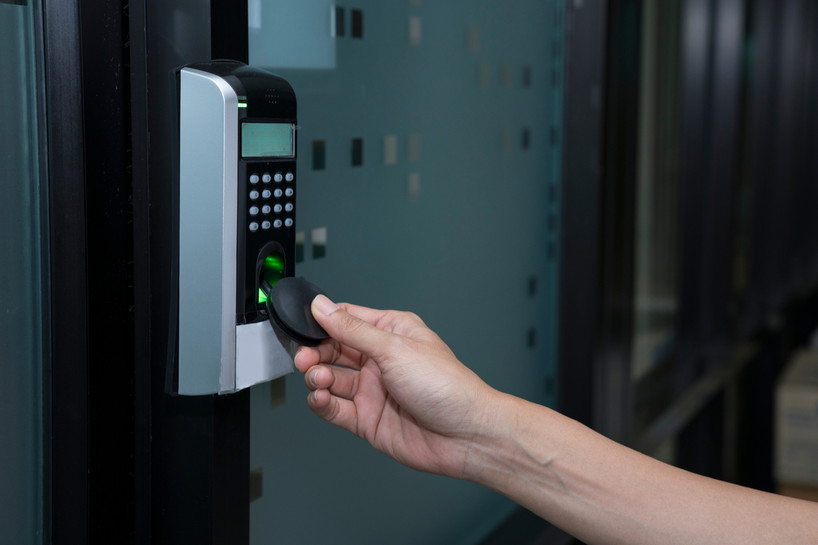
For centuries, "under lock and key" meant exactly that: a metal key, a keyhole and a hand turning one inside the other. Today, a growing number of locks open without anything touching them at all. You hold a card, a small fob or a sticker tag near the lock, and it opens. This is contactless locking, and RFID technology is what makes it work.
Contactless locking is now common on cabinets, drawers, display cases, lockers and hidden compartments, and it is increasingly used on interior doors too. In this guide, we explain how RFID and contactless locking actually works, what kinds of credentials you can use, why the lock can read through wood but not metal, what happens when the batteries run low, and how to set up a contactless lock so it stays both convenient and secure.
If you are still deciding whether RFID is right for you, our article on the biggest benefits of RFID locks covers the advantages and limitations in detail. Here, we focus on the technology itself and how to get the most out of it.
What Is Contactless Locking?
Contactless locking is any locking system that opens when an authorized credential is brought close to a reader, without being inserted, turned or pressed. The most common technology behind it is RFID, short for radio frequency identification. It is the same family of technology used in contactless payment cards, building access badges and transit passes.
An RFID contactless lock has three parts working together:
- The reader, built into the lock or into a separate sensor, which sends out a short-range radio field.
- The credential, such as a card, key fob or sticker tag, which contains a tiny chip and antenna with a unique ID.
- The lock mechanism, a battery-powered latch or bolt that opens only when the reader recognizes a programmed credential.
How an RFID Lock Reads a Card or Fob
Most RFID cards and fobs used with cabinet locks have no battery of their own. When you bring one close to the reader, the reader's radio field gives the chip just enough energy to respond with its ID. The lock compares that ID with the list of credentials it has been programmed to accept. If the ID matches, the lock releases. If it does not, nothing happens.
The whole exchange takes a moment, and because the card never has to touch the lock, there is no keyhole to wear out, no buttons to smudge and no slot for dirt to collect in. That is also why RFID locks can be completely hidden: the reader can sit behind a wooden panel, out of sight, and still read a card held against the outside.
Reading Distance Is Short on Purpose
Contactless locks are designed to read at very close range, usually well under two inches. Our 13.56 MHz key fobs, for example, list a reading distance of about 1/2 inch to 1 inch, and the actual distance through a hidden installation depends on the type and thickness of the wood. A short range is a security feature: someone walking past cannot accidentally or deliberately open your cabinet from across the room.
Why RFID Works Through Wood but Not Metal
Radio fields pass through wood, plastic and glass reasonably well, which is what allows a hidden lock to read through a cabinet door. Metal blocks and disrupts the signal. That is why RFID locks will not work through any metal material, including mirrors, which usually have a metal backing. If you are planning a hidden lock behind a mirror or inside a metal cabinet, look for a model with an external sensor that can be mounted where the signal is not blocked.
Panel thickness matters too. Our Gen 3 hidden RFID cabinet lock lists reliable function on wooden panels from 16 mm to 30 mm, while some external-sensor 125 kHz models need the sensor behind less than 1/2 inch of wood. Always check the product page for the panel range before you drill.

Hidden RFID Cabinet Lock, Gen 3
Invisible 13.56 MHz lock for 16 to 30 mm wood panels. Cards come programmed, just add batteries.
Shop NowContactless Locking vs Touch-Based Locks
It helps to compare contactless locking with the other ways a lock can be opened, because each has its own strengths.
- Keys need a visible keyhole, wear over time and can be copied. Once a key is lost, the only sure fix is to rekey or replace the lock.
- Keypads remove keys, but codes can be watched, shared or guessed, and worn or smudged buttons can hint at the code.
- Fingerprint readers are personal and hard to share, but the sensor has to be touched, kept clean and mounted where a finger can reach it.
- Contactless RFID can be fully hidden, never has to be touched and lets you add or remove credentials without changing the lock.
None of these is right for every situation, which is why many households mix them: a keyed or smart deadbolt on the front door, and contactless locks on the cabinets and compartments inside. Contactless locking is at its best where you want a clean, hidden look and quick access for a defined group of people.
Types of Contactless Credentials
One of the biggest advantages of contactless locking is choice. The same lock can often be opened with different styles of credential, so you can pick whatever suits the people using it.
RFID Cards
Credit-card-sized cards are the most common credential and usually come with the lock. On many of our locks, a 13.56 MHz card can be programmed as a management card, a user card or a service card, depending on the role you need it to play.
Key Fobs
A key fob does the same job as a card in a smaller package that lives on your key ring. Our 13.56 MHz fobs are about the size of a quarter and have a unique ID printed on each one, which makes it easy to keep track of who has which fob.
Sticker Tags
Soft sticker RFID tags are thin, adhesive tags that turn almost any object into a key. Peel off the backing and stick one onto a coaster, an ornament or another everyday item, and that object will open your lock. They are read-only, available in both 125 kHz and 13.56 MHz, and work through about 3/4 inch of wood, which makes them popular for concealment furniture and hidden compartments.
NFC and Other Cards
Some 13.56 MHz locks can also work with NFC cards, and a few even list some RFID-enabled bank cards as compatible. Support varies from model to model, so check the product description rather than assuming every card in your wallet will work.
You can browse cards, fobs, sticker tags, replacement strikes and power accessories in our RFID accessories collection.

Invisible RFID Lock with Key Fob
Open with RFID cards or the remote fob. 13.56 MHz with NFC support, no software needed.
Shop NowThe Two RFID Frequencies, Briefly
Contactless locks and their credentials operate on one of two frequencies: 125 kHz (low frequency) or 13.56 MHz (high frequency, the band used by Mifare and NFC). The key rule is simple: a credential only works with a lock on the same frequency. A 125 kHz fob will not open a 13.56 MHz lock, and the reverse is also true.
When you order extra cards or fobs, always match the frequency listed on your lock's product page. For a deeper explanation of the differences, see our guide to how key fob entry systems work.
Setting Up a Contactless Lock: Management and User Cards
Most of our RFID cabinet locks are programmed without any software or computer. They typically come with a management card and user cards. The management card is used to add or remove user credentials, and the user cards are the everyday keys.
Many of our locks arrive with the cards already programmed, so you only need to add batteries and install the lock. Some Bluetooth and RFID combination locks work differently: the cards and fobs must first be programmed to the lock through the app before they will open it.
A few setup tips help keep a contactless lock secure:
- Store the management card separately from the user cards, somewhere safe. Anyone holding it can change who has access.
- Keep a record of credentials, especially when you use fobs with printed IDs, so you know what to remove if one goes missing.
- Remove lost credentials promptly instead of waiting to see if they turn up.
- Mark the reader position discreetly on hidden installations so authorized users know where to hold the card.
Power: What Happens When the Batteries Run Low
Because the reader and latch are electronic, every contactless lock needs power, usually from AAA batteries, an external power supply or both. How a lock behaves when power runs low is one of the most important things to understand before you install it, and it varies by model.
- Some locks release when power gets critically low, so you are never locked out. One of our hidden RFID locks retracts its latch once voltage drops below a set level, and one of our multiple lock systems is designed so that full battery drainage leaves the lock unable to lock.
- Other locks stay locked when the batteries die, which is better for security but means you need a way to supply power from outside. Several of our external-sensor and glass-cabinet RFID locks work this way and include a power jack or a power supply option.
- Most models give a warning first. Many of our RFID locks sound a low-voltage alarm so you can change the batteries before they run out.
The practical takeaway: read the power section of the product page, note whether your lock fails open or fails locked, and keep spare batteries or a compatible power bank or power supply on hand.
Combining Contactless Locking With Other Methods
Contactless does not have to mean card-only. Some locks combine RFID with a second way in, which can add flexibility for households and workplaces with different users. Options in our range include RFID with a digital password keypad, RFID with Bluetooth app control, and RFID with a remote fob. A combined lock lets some users carry a card while others use a code or their phone.

Digital Password and RFID Lock
Open with a code or an RFID card. Comes with a manager card and 2 preprogrammed user cards.
Shop NowWhere Contactless Locking Works Best
Contactless RFID locks are especially useful anywhere you want quick access, a clean look or a lock that cannot be seen at all:
- Hidden compartments and concealment furniture, where an invisible lock keeps the space secret.
- Medicine, wine and firearm cabinets, where access should be limited to specific adults.
- Display cases and glass cabinets, with no-drill RFID options for glass doors.
- Offices, gyms and lockers, where cards or fobs can be issued and removed as people come and go.
- Secret room and bookcase doors, using an indoor-only hidden door lock that opens with RFID cards or a Bluetooth fob.
If you are planning a hidden installation, our guide on how to choose a hidden RFID cabinet lock walks through door thickness, power, latch modes and more.
Frequently Asked Questions
Is contactless locking secure?
Yes, when it is set up properly. Each credential has a unique ID, the reading range is very short, and lost cards or fobs can be removed from the lock. Keep the management card safe and remove lost credentials promptly.
Can I use my phone to open an RFID lock?
It depends on the lock. Some of our 13.56 MHz locks can work with NFC, and our Bluetooth and RFID combination locks can be operated with an app. Check the product page for the exact options.
Will an RFID lock read through glass?
Some models are designed for it. One of our RFID multiple lock systems lists reading through up to 1.5 inches of hardwood or glass, and we offer RFID locks made specifically for glass cabinet doors. RFID will not read through metal or mirrors.
Can I add more cards or fobs later?
Yes. Extra cards, fobs and sticker tags can be programmed to most of our locks. Just match the frequency of your lock.
Do contactless locks work on metal cabinets?
Not through the metal itself. RFID cannot read through metal or mirrors, so a hidden reader behind a metal door will not work. For metal furniture, choose a model with an external sensor that can be mounted where the card can reach it.
What happens if I lose a card?
Use the management card or the app, depending on your lock, to remove the lost credential, then program a replacement.
Make the Switch to Contactless Locking
RFID has turned "under lock and key" into something faster, cleaner and more flexible. Contactless locking lets you open a cabinet with a tap, hide the lock completely, choose between cards, fobs and sticker tags, and remove access without changing the lock. With the right frequency, the right panel thickness and a plan for power, a contactless lock is one of the simplest security upgrades you can make.
Explore our full range of RFID locks for wood and glass to find a hidden, glass-door or combination lock that fits your project. If you are unsure which model or frequency is right, our team is happy to help you choose.