
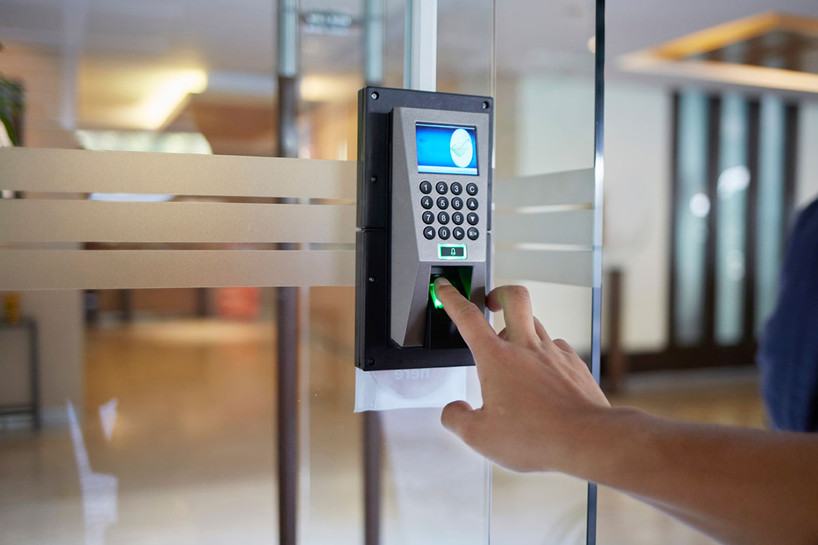
A fingerprint door lock uses biometric technology to match your print with saved data before unlocking.
-
These keyless entry door locks improve ease of use because you do not need to carry keys.
-
Compared with traditional locks, they add stronger security measures through registered biometric input.
-
Many models also support smart home features like alerts, app control, and remote access.
-
Backup entry options, such as a pin code or physical key, help if the sensor has issues.
-
Lock Connection offers modern options that fit everyday home security needs.
Introduction
A fingerprint door lock is a smart lock that opens by reading your fingerprint instead of relying only on keys. It uses biometric technology to compare your scan with stored fingerprint data, then releases the locking mechanism if there is a match. That sounds advanced, but the idea is simple. You touch the sensor, the lock checks your identity, and the door opens. If you want a cleaner, faster way to secure your home, this type of lock is worth understanding.
Understanding Fingerprint Door Locks
Fingerprint locks are keyless entry door locks that use biometric technology to confirm who you are, including analyzing your unique facial features. Instead of a standard key, you use your finger as the credential. The lock scans your print and compares it with saved patterns in its system.
That simple process makes these locks a standout option in modern security systems. You get fast entry, fewer worries about lost keys, and better control over who can enter. To see why many homeowners make them a preferred choice, it helps to look at what makes them different.
What Makes Fingerprint Door Locks Unique?
What makes these locks different is the way they identify you. A standard lock depends on something you carry, like a key. Modern biometric door locks depend on a unique fingerprint that belongs to you. That changes how access works at the door.
Because your fingerprint is personal, these locks reduce the risk linked to lost or stolen keys. That is one reason they have become a preferred choice for homeowners who want stronger control over entry. You touch the sensor, and the system checks for a match in seconds.
The key benefits go beyond security. You also get easier daily access and fewer lockouts caused by missing keys. Some models add app-based features, temporary access, and alerts, which makes them a practical fit for busy homes and modern routines.
How Biometric Authentication Works in Fingerprint Locks
Biometric authentication starts when you place your finger on the sensor. The biometric lock reads the pattern of your print, along with potential iris patterns, and turns it into digital information. It does not just look at the surface. It checks unique points in the print for identity matching.
Next, the lock compares that scan with saved fingerprint data already stored in its system. If the new scan matches one of the approved records, the device confirms your identity. After that, the locking mechanism disengages so you can enter.
These steps are part of the lock’s built-in security measures. The goal is simple: allow access only to approved users. Since the system relies on registered patterns instead of a copied key, it adds a stronger layer of protection for your door.
The Key Features of Modern Fingerprint Door Locks
Today’s fingerprint locks do more than open a door. Their key benefits include faster entry, better identity checking, and stronger protection than many traditional locks. Biometric technology gives you a direct way to unlock without reaching for a key.
Many models also include additional features like smartphone alerts, app control, and backup entry methods. When you compare options on Lock Connection, focus less on hype and more on how the lock fits your door, your routine, and the overall performance of our website shopping experience.
Security Technology Used in Fingerprint Locks
A biometric lock uses security technology that checks identity before opening the door. The main protection comes from comparing a live fingerprint scan with saved biometric data. That makes it harder for unauthorized people to enter using a lost item or guessed code.
Many units also work well inside wider security systems. They can send notifications, connect through Wi-Fi or Bluetooth, and support app-based monitoring. This gives you more visibility into lock activity, which adds peace of mind whether you are home or away.
Good models also include backup access methods. If the sensor does not read your finger or the batteries run low, you may still get in with a pin code, key fob, key card, or physical key. That backup layer matters in real daily use.
Convenience and Usability Benefits for Homeowners
For many homeowners, the biggest win is ease of use. You do not need to search your pocket or remember a code every time you arrive. A smart lock with fingerprint access turns entry into one quick touch.
It also fits busy households well. Some locks support remote access through an app, while others let you manage user profiles for family, guests, or short-term visitors. That gives you more control without making daily entry harder.
Useful benefits often include:
-
quick action at the door when your hands are full
-
easier guest management through user profiles
-
remote access and alerts through connected features
-
less dependence on carrying a key every day
Popular Types of Fingerprint Door Locks
There is more than one fingerprint door lock style. The right door lock depends on your entry setup, your habits, and the level of control you want. Some focus on simple fingerprint entry, while others combine several ways to unlock.
In the wider market, each lock type serves different needs. You will find standalone biometric lock options, deadbolts, lever styles, and connected systems that work with smart home devices. The next two sections break down the most common choices in a clear way.
Deadbolt Fingerprint Locks & Lever Handle Models
Deadbolt fingerprint locks are one of the most common options for residential use. They replace or upgrade the standard deadbolt and add biometric access at the same time. This style works well if you want familiar hardware with a more modern entry method.
A lever handle model offers a different practical design. Instead of only changing the deadbolt, it combines the handle and access control in one unit. That can be useful for interior access points, side doors, or places where a handle style feels more natural.
Both options use a similar locking mechanism. You scan your fingerprint, the system checks for a match, and the lock releases. The better choice depends on your door setup and how you want the lock to look and function every day.
Smart Lock Systems with Multiple Access Methods
Some homeowners want more than fingerprint entry alone. A smart lock with several access choices can be a better fit. These systems may combine fingerprint access with app control, a pin code, key fob support, or other backup access methods.
That flexibility matters in everyday life. If one method is not convenient, another is ready. Connected models may also work with a smart hub, giving you remote control and activity updates through a smartphone app.
|
Access Method |
How It Helps |
|---|---|
|
Fingerprint scan |
Fast entry using biometric authentication |
|
Pin code |
Helpful for family or guests without registered prints |
|
Smartphone app |
Supports remote control and notifications |
|
Physical key or key card |
Useful as backup access methods during power or sensor issues |
How Fingerprint Door Locks Work Step by Step
The process starts when you place your finger on the sensor. The lock reads the pattern and converts it into biometric data. From there, biometric authentication begins. The device checks the scan against saved records inside its system. If your print matches a registered biometric input, the system approves access and the lock opens. If it does not match, the door stays locked. That is the basic answer to how fingerprint door locks work.
Behind the scenes, the lock is doing the same core steps each time: authentication, verification, and unlocking. Modern security systems may add alerts, app control, and integration with connected devices, but the goal stays the same. The lock confirms identity first, then grants entry only to approved users. That is what makes fingerprint access both simple and effective.
Scanning and Storing Your Fingerprints Securely
When you enroll your fingerprint, the biometric lock scans your print and saves its unique pattern in digital form. During normal use, it compares a new scan to that stored record. The system is looking for a match, not just a casual surface image.
Because fingerprint data is sensitive data, manufacturers use advanced encryption to protect it. That matters because a lock should not only identify users well, but also keep stored records private. Secure storage is a major part of safe biometric design.
This is one reason fingerprint locks can be safer than many traditional locks. A key can be lost, copied, or stolen. A registered fingerprint is much harder to duplicate in real life. Add backup access and good device design, and you get stronger day-to-day protection.
Comparing Fingerprint Locks to Traditional Locks
Traditional locks still work well for many homes, but they rely on physical items that can be misplaced or copied. A standard door lock opens with the right key, which sounds simple until the key is lost or ends up in the wrong hands. Fingerprint locks change that by using biometric identity instead of depending only on something you carry. For many homeowners, that creates a stronger first line of defense.
The safety difference comes from how each system verifies access. Traditional locks check the key. Fingerprint locks check the person. That shift improves security measures and can also make daily entry easier. Many modern models add alerts, app control, and backup methods, which gives them an edge in both convenience and control. Still, it is smart to understand both the strengths and the limits before you buy.
Safety Advantages and Potential Limitations
Fingerprint locks offer significant advantages for home entry. Since they use biometric technology, they reduce the risks that come with lost keys or shared access codes. They also fit well into modern security measures, especially when paired with alerts and connected controls.
At the same time, there are potential challenges to keep in mind. Like other electronic devices, these locks can face sensor errors, battery issues, or setup limits. That does not make them a bad choice. It just means you should choose carefully and use the backup options provided.
Key points to remember:
-
significant advantages include stronger identity-based access and easier daily entry
-
potential challenges may include malfunctions, power needs, or compatibility concerns
-
strong backup access features help reduce many of these risks
Are Fingerprint Locks Easy to Hack or Bypass?
Many people ask if a fingerprint door lock is easy to hack or bypass. The compiled information points to the opposite. These locks use unique biometric data, which is far harder to copy than a physical key or a simple code. That built-in identity check raises the barrier for unauthorized entry.
A quality biometric lock also protects sensitive data with advanced encryption. That means the system is designed not only to recognize approved users, but also to keep stored records private. Good security systems add more protection through alerts, app updates, and backup controls.
No lock is perfect, and electronic devices can have technical issues. Still, fingerprint locks are not presented as easy targets. With proper setup, reliable power, and backup entry methods, they offer strong real-world resistance compared with basic lock systems.
Factors to Consider Before Buying a Fingerprint Door Lock
Before you buy, think about your lock type, your door setup, and your security needs. Not every model fits every door, and not every homeowner needs the same features. Start with the basics: compatibility, durability, and how you want to unlock the door.
After that, look at additional features like app control, alerts, backup entry, and smart home compatibility. Some buyers also prefer professional installation for a smoother setup. If you browse Lock Connection, compare models by how they fit your daily routine, not just by appearance.
Installation Requirements for Standard U.S. Doors
Installation depends on whether the lock matches your door’s existing hardware and locking system. The compiled information stresses compatibility as a key buying factor. That means you should first confirm the model works with your door style and current setup before ordering.
For some homeowners, installation may be simple. For others, professional installation is the safer route. A proper fit helps the lock work as it should and reduces setup mistakes that could affect security or ease of use later. That is especially helpful when the lock includes app features or connected functions.
When you shop online, clear product details matter. The performance of our website also matters because it helps you compare fit, features, and support before purchase. At Lock Connection, use product pages to check installation requirements carefully before making your final choice.
How to Choose the Right Model from Lock Connection
Start by matching the lock type to your entry point. A front door may call for a deadbolt-focused design, while another opening may work better with a lever model or a connected smart lock. The right style depends on how you use that door every day.
Then think about your specific security needs. Do you want fingerprint-only access, or would backup methods like a pin code and physical key make you feel more comfortable? Do you want app alerts or remote features? Those questions help narrow the list quickly.
When you browse Lock Connection, focus on compatibility, durability, connectivity, and power needs. The ideal choice is not the one with the longest feature list. It is the one that fits your door, supports your routine, and gives you the level of control you actually need.
Everyday Use and Reliability of Fingerprint Door Locks
In everyday use, a fingerprint lock is built for speed and simplicity. You touch the sensor, the lock checks your print, and the door opens if there is a match. That routine supports both reliability and ease of use for busy households.
Still, reliability depends on proper setup, battery care, and good backup options. Many connected models also fit into a smart home system, adding alerts and control features. To keep that smooth experience going, it helps to know how to handle small issues and basic maintenance.
Dealing with Common Issues and Troubleshooting
Like any electronic device, fingerprint locks can run into small problems. Common issues may include sensor errors, low battery power, or temporary app connection trouble. Most of these problems are manageable, especially when the lock includes backup entry methods.
A simple troubleshooting approach can save time. Check the power source, confirm the fingerprint is enrolled correctly, and try the backup method if needed. If your model connects to an app, support pages or live web chat platforms can also help guide you through the next step.
Helpful steps include:
-
check battery status if the lock stops responding
-
use backup entry to avoid lockouts and reduce false alarms
-
contact expert support if setup or connectivity problems continue
Maintenance Tips to Keep Your Lock Working Smoothly
Good maintenance keeps your fingerprint door lock reliable over time. Most models rely on batteries or direct power, so staying ahead of power issues is important. A little routine care can prevent problems before they affect your entry.
It also helps to watch how the lock performs day to day. If response time changes or the app stops updating, take quick action instead of waiting. Regular checks are a simple way to protect convenience and security at the same time.
Keep things running smoothly with habits like these:
-
replace batteries on time and monitor power warnings
-
perform regular checks on app connectivity and lock response
-
use quick action when alerts, sensor errors, or access delays appear
Conclusion
In summary, fingerprint door locks represent a significant advancement in home security technology, combining convenience with cutting-edge biometric authentication. These locks not only provide a high level of safety but also enhance the overall user experience, making it easier for homeowners to manage access to their properties. By considering factors such as installation requirements and model selection from Lock Connection, you can ensure that you're choosing the right fingerprint lock that meets your needs. As you explore these innovative locking solutions, remember that maintaining your lock is key to its longevity and reliability. Ready to elevate your home security? Visit Lock Connection today to browse our range of fingerprint door locks!
Frequently Asked Questions
How many fingerprints can I register on a single lock?
The exact number depends on the model, since each fingerprint door lock handles user profiles differently. Before buying, check the product details at Lock Connection to see how many users are supported. A higher limit is helpful if you want several family members or guests to have registered biometric input.
Can weather or dirt affect fingerprint recognition?
Yes, outdoor conditions and buildup can affect how well a fingerprint lock reads your finger. Many models are designed with weather-resistant materials, but basic care still helps. Keeping the sensor clean supports ease of use and helps biometric technology read accurately while still protecting your sensitive data.
Is there a backup way to enter if the fingerprint sensor fails?
Yes. Many models include backup access methods such as a physical key, pin code, key fob, or key card. That is an important part of smart lock device security. If the sensor has trouble or power runs low, these options help you get inside without losing access.